Laser Services
Everything you need to launch laser services at your location. Start with the essentials below or jump into the full course.
General Operation
- Power on: Turn the key switch to ON, then press the green power button on the control panel.
- Shut down: Press the red stop button, wait for the cooling cycle to finish, then turn the key to OFF.
- Water flow sensor
- Cooling system temperature
- Laser diode readiness
- 755 nm — Targets melanin in shallow follicles; ideal for fine/light hair.
- 808 nm — Gold-standard diode wavelength for medium-depth follicles.
- 940 nm — Deeper penetration for thicker hair and darker skin.
- 1064 nm — Deepest reach with the safest profile for Fitzpatrick V–VI skin types.
Cooling System
- The sapphire crystal tip is chilled by the internal water circulation system.
- In Ready mode, the tip cools to near 0°C.
- Full flush contact with the skin is required — angling or hovering removes the cooling benefit while the laser still fires, risking burns.
- Target: as close to 0°C as possible.
- Minimum: sapphire tip must be below 7°C.
- You should see condensation or frost on the tip.
- If the tip feels warm or dry, do NOT treat.
- Check the water level daily before your first treatment.
- Always fill with distilled water to the marked line.
- Low water triggers a system alarm and can damage the cooling pump.
- Replace the water filter core every 3 months or when flow rate drops.
Handpiece & Spot Size
- No. The Diolux Quad (the “Emvera”) has a fixed large-format spot size (~12×20 mm).
- Only the Hello Sugar proprietary machine uses interchangeable tips — when changing tips, the machine must be in Standby and the correct spot size selected on screen.
- After each client, wipe the sapphire window with a soft lint-free cloth dampened with distilled water.
- For stubborn residue, use isopropyl alcohol on the cloth.
- Never scrape the sapphire surface or use abrasive materials.
Settings & Parameters
- Fluence (J/cm²) — Controls total energy delivered. Lighter skin can tolerate higher fluence.
- Pulse Width (ms) — The primary safety lever. Increase it for darker skin to bypass the epidermis.
- Frequency (Hz) — Controls firing speed. 1–3 Hz for detail/face work, 5–10 Hz for body (in-motion).
Safety
- Technician: Wavelength-rated safety glasses covering 755–1064 nm with OD > 5.
- Client: Opaque metal eye shields or wavelength-specific goggles.
- Stop treatment immediately.
- Apply a cold compress to the area.
- Do not apply topical creams unless directed by a medical professional.
- Document the incident with photos and notes.
- Notify your manager and follow your location’s incident reporting procedure.
Troubleshooting
- Verify the water tank is filled to the line with distilled water.
- Check that the water flow sensor is not blocked.
- Ensure the key is fully turned to ON.
- If the screen shows an error code, refer to the error code table below.
- If the issue persists, power cycle the machine (off for 30 seconds, then on).
- Contact your manager if the problem continues.
- Check the water level and filter.
- Feel the water lines running to the handpiece — they should be cold.
- If the lines are warm, the cooling pump may have failed.
Warning Icons & Error Codes
If the machine displays any of the following alarms or error codes, stop treatment and troubleshoot before continuing.
Common Alarms
- Water Flow Warning: Water level low or flow sensor blocked. Refill with distilled water and check the filter.
- Over-Temperature: Internal temperature too high. Let the machine cool for 10–15 minutes before resuming.
- Handpiece Disconnected: The handpiece cable is loose. Power down, reseat the connector, and restart.
- Interlock Open: The safety interlock (door sensor or key) is disengaged. Verify the door is closed and the key is in the ON position.
Error Codes
| Code | Meaning | Action |
|---|---|---|
| E01 | Water flow failure | Check tank level & filter; restart |
| E02 | Cooling system over-temp | Power off, wait 15 min, restart |
| E03 | Laser diode fault | Power cycle; if persists, contact service |
| E04 | Handpiece communication error | Reseat handpiece connector; restart |
| E05 | Power supply fault | Check outlet & breaker; contact service |
| E06 | Interlock fault | Verify door closed & key ON; restart |
Water & Cooling System
- Use only distilled water — tap water causes mineral buildup and sensor damage.
- Check the water level daily before first treatment.
- Replace the water filter core every 3 months (or when flow rate drops).
- Drain and refill the entire tank every 6 months.
- Inspect water lines for kinks, leaks, or discoloration monthly.
Optical & Handpiece Care
- Wipe the sapphire tip with a soft lint-free cloth after every client.
- Use distilled water or isopropyl alcohol on the cloth — never abrasive materials.
- Inspect the tip for cracks or chips weekly; do not treat with a damaged tip.
- Check the handpiece cable for fraying or exposed wires weekly.
- Store the handpiece in its holster when not in use to prevent drops.
Periodic & Storage
- Run a full cooling cycle (ready mode with no treatment) once per week to test the system.
- Clean the exterior panels and screen with a damp cloth weekly.
- If the machine will be unused for more than 2 weeks, drain the water tank and run the pump dry for 30 seconds.
- Store in a climate-controlled environment (15–30 °C, <80% humidity).
General System Safety
- Always power down using the proper shutdown sequence — never pull the plug.
- Never block the rear ventilation openings.
- Ensure the machine is plugged into a dedicated circuit (no shared outlets with high-draw devices).
- Keep the area around the machine clear of liquids, gel spills, and clutter.
Water Filter Core Replacement
- Power off the machine and unplug it.
- Locate the filter housing on the rear or side panel.
- Turn the filter cap counterclockwise and remove the old filter core.
- Insert the new filter core and hand-tighten the cap clockwise.
- Refill the water tank with fresh distilled water to the marked line.
- Plug in and power on. Run a ready-mode cycle to circulate water and check for leaks.
Maintenance Schedule Summary
| Frequency | Task |
|---|---|
| After each client | Wipe sapphire tip with lint-free cloth |
| Daily | Check water level; top off with distilled water |
| Weekly | Inspect tip for damage; check handpiece cable; clean exterior; run test cooling cycle |
| Monthly | Inspect water lines for kinks/leaks |
| Every 3 months | Replace water filter core |
| Every 6 months | Drain & refill water tank completely |
- Always use distilled water — tap water voids cooling system warranties.
- Never treat with a cracked or chipped sapphire tip.
- If an error code persists after power cycling, tag the machine out of service.
- Log all maintenance in the location's equipment maintenance sheet.
Laser Promos — Commission (%)
| Staff Level | Commission (%) |
|---|---|
| Apprentice | 20.00% |
| Intermediate – Regular | 20.42% |
| Intermediate – High | 21.50% |
| Advanced – Regular | 21.50% |
| Advanced – High | 22.92% |
| Distinguished – Regular | 23.75% |
| Distinguished – High | 24.90% |
| Expert – Regular | 24.90% |
| Expert – High | 25.94% |
Laser Member Services — Commission ($)
| Staff Level | XS | SM | MED | LG |
|---|---|---|---|---|
| Apprentice | $5.00 | $7.00 | $17.00 | $19.00 |
| Intermediate – Regular | $5.00 | $7.00 | $18.00 | $20.00 |
| Intermediate – High | $6.00 | $8.00 | $19.00 | $21.00 |
| Advanced – Regular | $6.00 | $8.00 | $19.00 | $22.00 |
| Advanced – High | $6.50 | $9.00 | $20.00 | $23.00 |
| Distinguished – Regular | $6.50 | $9.00 | $21.00 | $23.00 |
| Distinguished – High | $7.00 | $10.00 | $22.00 | $24.00 |
| Expert – Regular | $7.00 | $10.00 | $22.00 | $25.00 |
| Expert – High | $8.00 | $11.00 | $23.00 | $27.00 |
Laser Member Services — Commission (%)
| Staff Level | XS | SM | MED | LG |
|---|---|---|---|---|
| Apprentice | 16.7% | 15.6% | 20.0% | 17.3% |
| Intermediate – Regular | 16.7% | 15.6% | 21.2% | 18.2% |
| Intermediate – High | 20.0% | 17.8% | 22.4% | 19.1% |
| Advanced – Regular | 20.0% | 17.8% | 22.4% | 20.0% |
| Advanced – High | 21.7% | 20.0% | 23.5% | 20.9% |
| Distinguished – Regular | 21.7% | 20.0% | 24.7% | 20.9% |
| Distinguished – High | 23.3% | 22.2% | 25.9% | 21.8% |
| Expert – Regular | 23.3% | 22.2% | 25.9% | 22.7% |
| Expert – High | 26.7% | 24.4% | 27.1% | 24.6% |
A La Carte Laser Services — Commission ($)
| Staff Level | XS ($60) | SM ($95) | MED ($160) | LG ($200) |
|---|---|---|---|---|
| Apprentice | $5.00 | $7.00 | $17.00 | $19.00 |
| Intermediate – Regular | $5.00 | $7.00 | $18.00 | $20.00 |
| Intermediate – High | $6.00 | $8.00 | $19.00 | $21.00 |
| Advanced – Regular | $6.00 | $8.00 | $19.00 | $22.00 |
| Advanced – High | $6.50 | $9.00 | $20.00 | $23.00 |
| Distinguished – Regular | $6.50 | $9.00 | $21.00 | $23.00 |
| Distinguished – High | $7.00 | $10.00 | $22.00 | $24.00 |
| Expert – Regular | $7.00 | $10.00 | $22.00 | $25.00 |
| Expert – High | $8.00 | $11.00 | $23.00 | $27.00 |
A La Carte Laser Services — Commission (%)
| Staff Level | XS ($60) | SM ($95) | MED ($160) | LG ($200) |
|---|---|---|---|---|
| Apprentice | 8.3% | 7.4% | 10.6% | 9.5% |
| Intermediate – Regular | 8.3% | 7.4% | 11.3% | 10.0% |
| Intermediate – High | 10.0% | 8.4% | 11.9% | 10.5% |
| Advanced – Regular | 10.0% | 8.4% | 11.9% | 11.0% |
| Advanced – High | 10.8% | 9.5% | 12.5% | 11.5% |
| Distinguished – Regular | 10.8% | 9.5% | 13.1% | 11.5% |
| Distinguished – High | 11.7% | 10.5% | 13.8% | 12.0% |
| Expert – Regular | 11.7% | 10.5% | 13.8% | 12.5% |
| Expert – High | 13.3% | 11.6% | 14.4% | 13.5% |
Combo Member Services — Commission ($)
| Staff Level | Pick 2 | Pick 3 | Pick 4 | Pick 5 | Pick 6 | Pick 7 | Pick 8 | Pick 9 | Pick 10 |
|---|---|---|---|---|---|---|---|---|---|
| Apprentice | $22.00 | $35.00 | $43.00 | $53.00 | $60.00 | $66.00 | $74.00 | $80.00 | $87.00 |
| Intermediate – Regular | $22.00 | $35.00 | $43.00 | $53.00 | $60.00 | $66.00 | $74.00 | $80.00 | $87.00 |
| Intermediate – High | $24.00 | $37.00 | $45.00 | $55.00 | $62.00 | $68.00 | $76.00 | $82.00 | $89.00 |
| Advanced – Regular | $26.00 | $39.00 | $47.00 | $57.00 | $64.00 | $70.00 | $78.00 | $84.00 | $91.00 |
| Advanced – High | $28.00 | $41.00 | $49.00 | $59.00 | $66.00 | $72.00 | $80.00 | $86.00 | $93.00 |
| Distinguished – Regular | $28.00 | $41.00 | $49.00 | $59.00 | $66.00 | $72.00 | $80.00 | $86.00 | $93.00 |
| Distinguished – High | $30.00 | $43.00 | $51.00 | $61.00 | $68.00 | $74.00 | $82.00 | $88.00 | $95.00 |
| Expert – Regular | $30.00 | $43.00 | $51.00 | $61.00 | $68.00 | $74.00 | $82.00 | $88.00 | $95.00 |
| Expert – High | $32.00 | $45.00 | $53.00 | $63.00 | $70.00 | $76.00 | $84.00 | $90.00 | $97.00 |
Combo Member Services — Commission (%)
| Staff Level | Pick 2 | Pick 3 | Pick 4 | Pick 5 | Pick 6 | Pick 7 | Pick 8 | Pick 9 | Pick 10 |
|---|---|---|---|---|---|---|---|---|---|
| Apprentice | 18.3% | 21.2% | 20.4% | 20.6% | 23.7% | 26.0% | 29.0% | 31.30% | 34.40% |
| Intermediate – Regular | 18.3% | 21.2% | 20.4% | 20.6% | 23.7% | 26.0% | 29.0% | 31.30% | 34.40% |
| Intermediate – High | 20.0% | 22.4% | 21.3% | 21.4% | 24.5% | 26.8% | 29.8% | 32.10% | 35.20% |
| Advanced – Regular | 21.7% | 23.6% | 22.3% | 22.2% | 25.2% | 27.5% | 30.6% | 32.90% | 35.90% |
| Advanced – High | 23.3% | 24.9% | 23.2% | 23.0% | 26.0% | 28.3% | 31.4% | 33.70% | 36.70% |
| Distinguished – Regular | 23.3% | 24.9% | 23.2% | 23.0% | 26.0% | 28.3% | 31.4% | 33.70% | 36.70% |
| Distinguished – High | 25.0% | 26.1% | 24.2% | 23.8% | 26.8% | 29.1% | 32.2% | 34.40% | 37.50% |
| Expert – Regular | 25.0% | 26.1% | 24.2% | 23.8% | 26.8% | 29.1% | 32.2% | 34.40% | 37.50% |
| Expert – High | 26.7% | 27.3% | 25.1% | 24.5% | 27.6% | 29.9% | 32.9% | 35.20% | 38.30% |
Membership Startup Commissions
Startup commissions are the same regardless of pay tier
| Membership Type | Sale Price | Commission ($) | Commission (%) |
|---|---|---|---|
| Single Area XS or S | $250 | $17.00 | 6.8% |
| Single Area M or L | $450 | $30.00 | 6.7% |
| Combo | $450 | $45.00 | 10.0% |
Laser Courses
Step-by-step courses to get laser up and running at your location.
Laser Onboarding for Owners
Everything you need to bring laser services to your salon.

Laser MCR Course
How to sell laser memberships and boost conversion rates with prospects.
Welcome to the Laser Onboarding Course
Your quick-reference guide to getting laser launched.
Introduction from Brigham Dallas
Hello Sugar launched laser services in July 2024 after discovering that 1 in 10 membership cancellations were due to clients leaving to try laser elsewhere. Laser is projected to become 25% of revenue for locations that offer it, with strong profit margins.
Laser Program Timeline
- July 2024: Laser services launched in Arizona
- Nov 2024: First Black Friday laser sale (many owners covered most of their laser costs from this sale alone)
- Jan 2025: NILA school launched for esthetician certification
- Aug 2025: Laser equipment costs cut in half (from ~$50K to ~$25K per unit)
- Jan 2026: New membership model rolled out company-wide
How the Membership Works
Clients pay a one-time $450 lifetime membership fee, then pay per session. There are two pricing options:
Single services are priced by area size: large (e.g. full legs), medium (e.g. Brazilian), or small (e.g. lip and chin).
Combos let clients stack services from a menu. Pick 2 or more and get underarms free. The most popular combo is the Pick 3: full legs + Brazilian + underarms for $160/session. About 16 treatments are needed for full results.
Early Results (Arizona)
Laser conversion rate jumped from 20% to 55% in the first month on the new membership model. Membership sales went from 9 to 21 per month.
Esthetician Retention
Estheticians earn $32 to $41/hr base from laser services, plus tips on $115 to $160 services, with potential earnings around $70/hr. This is significantly higher than what dedicated laser salons pay (typically ~$20/hr). Losing a mature esthetician costs approximately $5,000, so the retention benefit is significant.
NILA Certification School
NILA is a third-party certification school that trains and certifies estheticians for laser. The franchise owner pays nothing upfront — Hello Sugar sponsors a scholarship. Market rate for CLT certification is ~$6,000; NILA offers it for $3,600. The cost is recouped through the esthetician's first 25 laser membership sale commissions. The esthetician commits to 9 months with the company. If they leave early, NILA absorbs the loss, not the franchise owner.
Laser Program Overview and Alignment
Responsibility Matrix: Who Owns What?
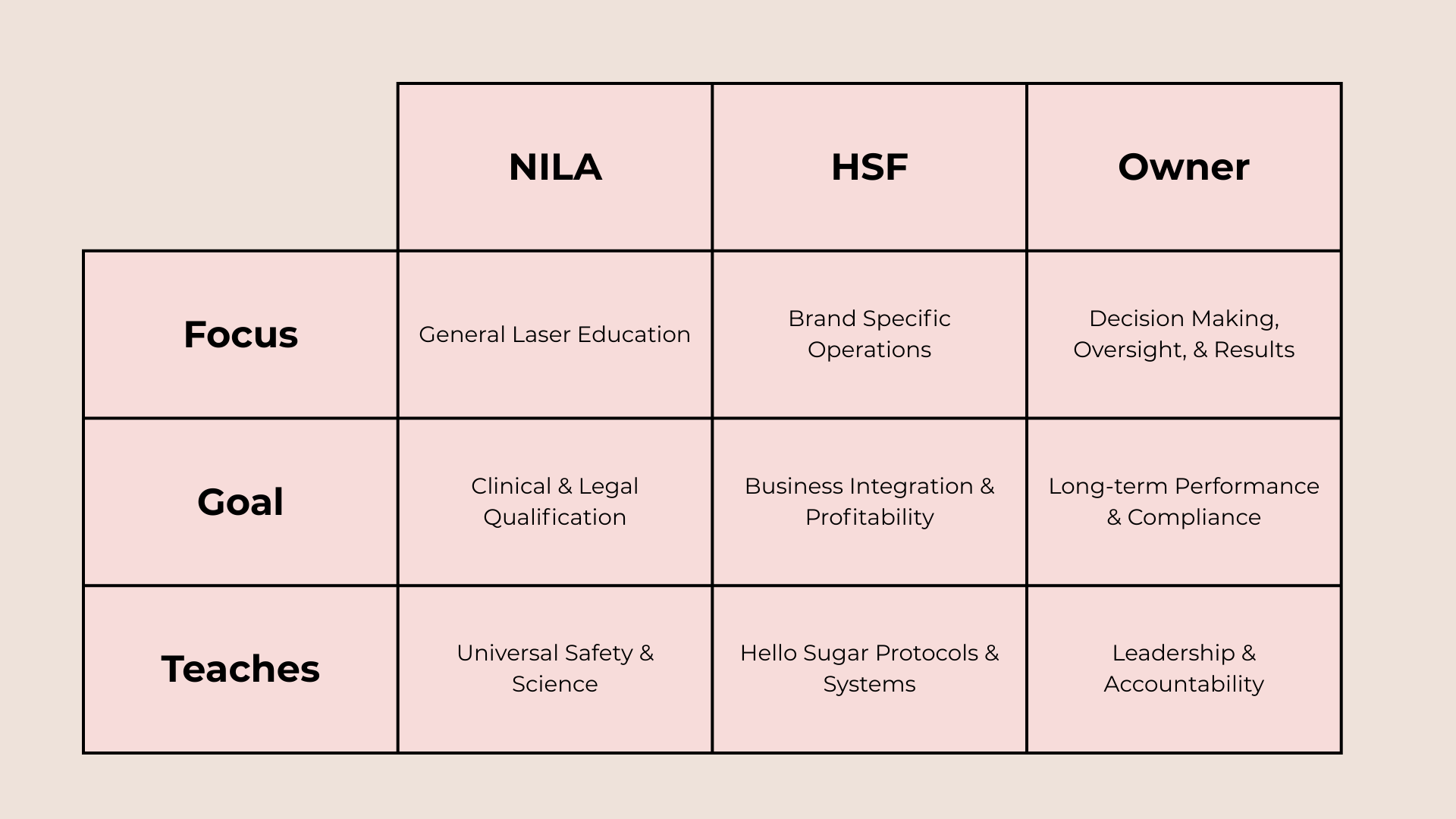
The laser program is a partnership between three parties: NILA, Hello Sugar Franchise, and You (the owner).
NILA handles general laser education with a focus on clinical and legal qualification. They teach universal safety and science.
Hello Sugar Franchise handles brand-specific operations with a focus on business integration and profitability. They teach Hello Sugar protocols and systems.
You (the Owner) focus on decision making, oversight, and results. Your goal is long-term performance and compliance.
The program is broken into six phases. Each phase should be completed before moving to the next.
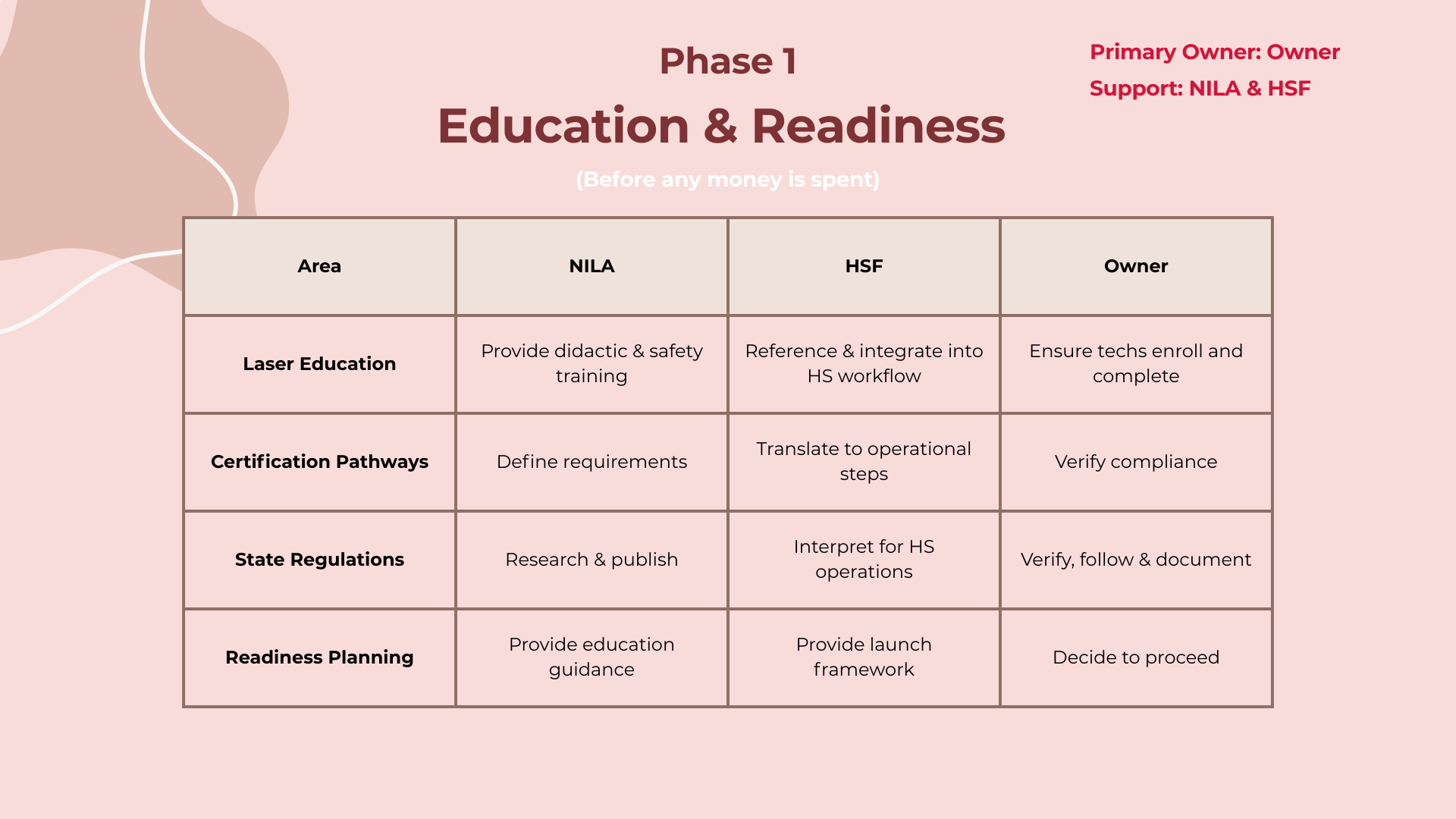
Phase 1: Education and Readiness
This happens before any financial commitment. Understand your state requirements and decide if your location is prepared before spending any money.
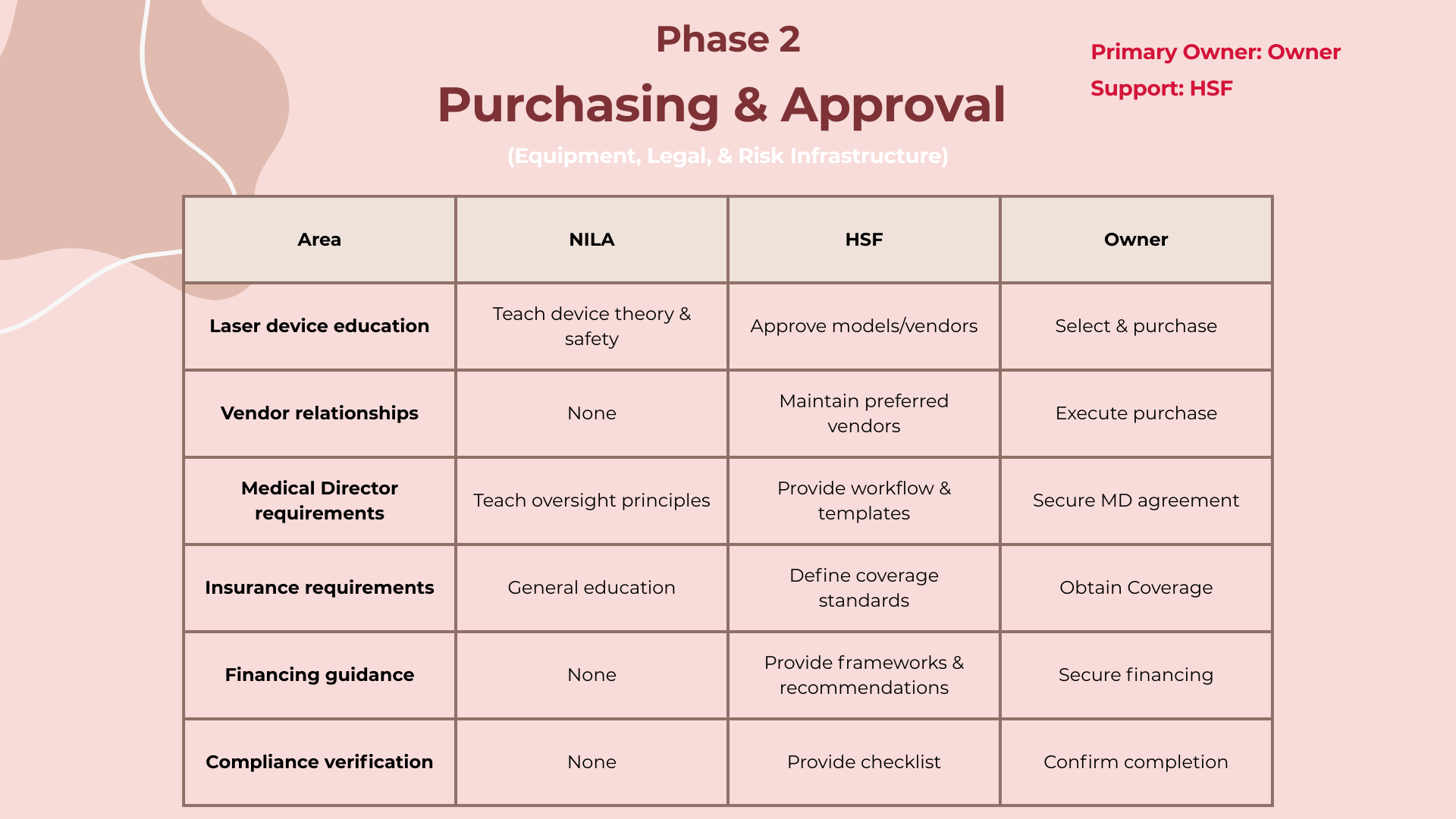
Phase 2: Purchasing and Approval
This is where laser becomes real financially and legally. Start thinking about your medical director early — some states like Texas require two.
Phase 3: Facility and System Setup
Preparing to treat clients by building a safe, repeatable environment. Your responsibility is making sure your location meets standards before seeing any clients.
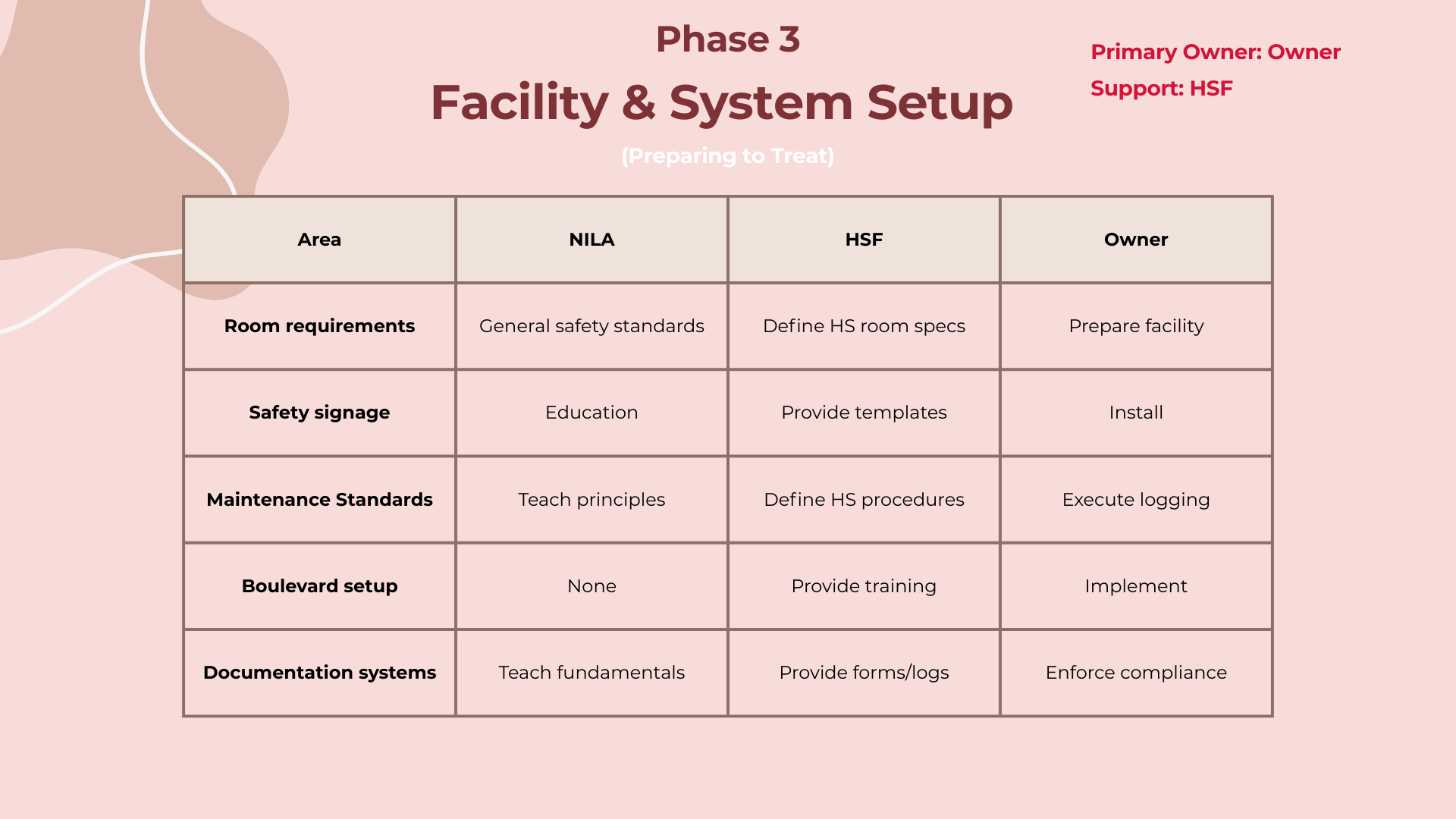
Phase 4: Staffing and Training
Great equipment fails without prepared people. Make sure you have the right people with the right certifications before moving forward.
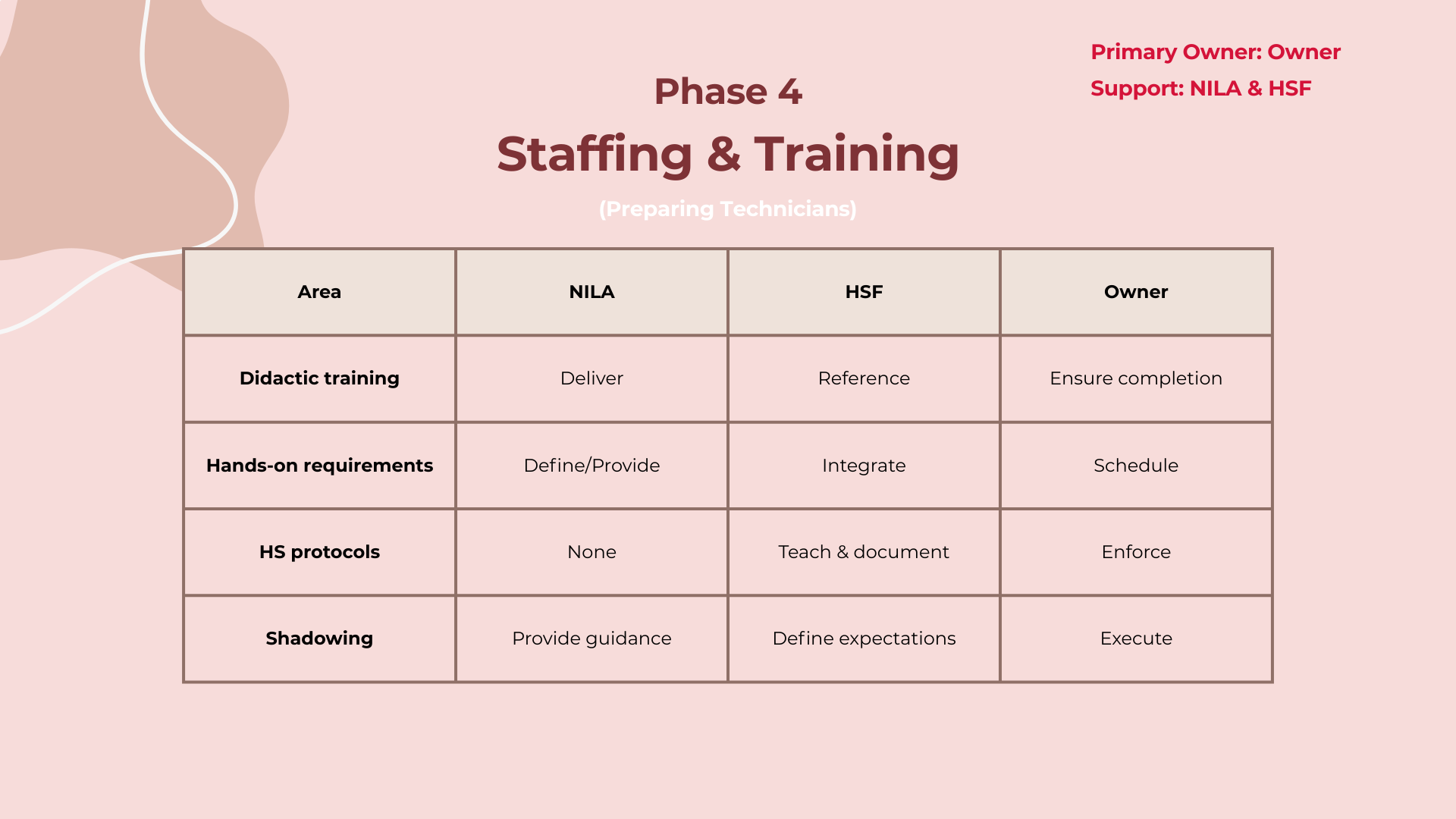
Phase 5: Launch and Operations
Where systems meet real clients. You are responsible for the daily execution of laser services.
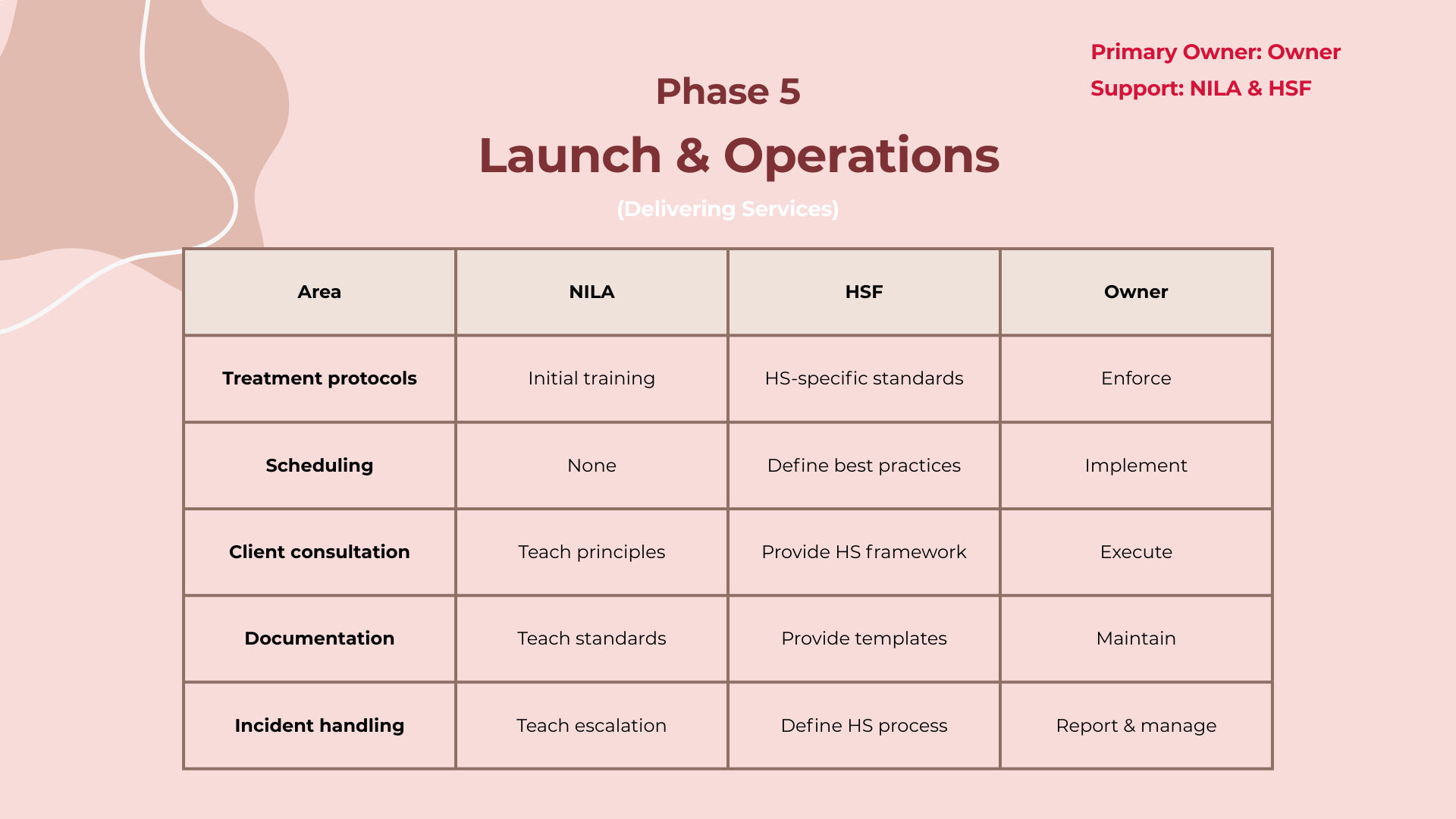
Phase 6: Performance and Optimization
Launch is temporary. Management is permanent. You own performance, culture, and results.
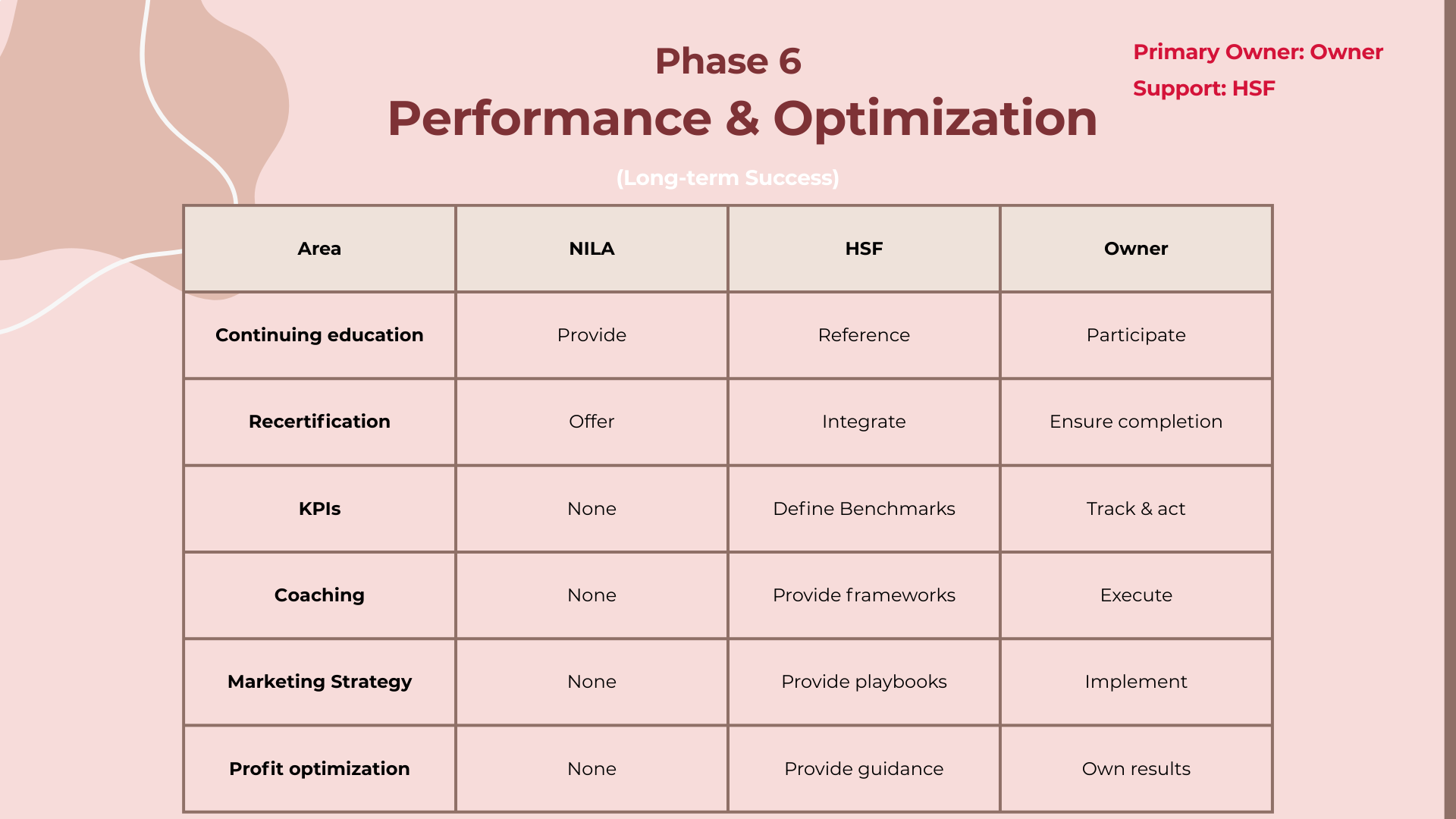
From Decision to First Treatment: A High-Level Timeline
Most locations move through five overlapping phases from decision to first client treatment. The whole process typically takes 8 to 12 weeks depending on your state.
The Standard Launch Path
- Phase 1 (Weeks 0–2): Confirm state requirements, certification pathways, medical oversight needs, and insurance expectations.
- Phase 2 (Weeks 2–6): Onboard a medical director, activate insurance, order approved laser equipment.
- Phase 3 (Weeks 4–8): Enroll technicians in certification programs, complete education, schedule hands-on requirements.
- Phase 4 (Weeks 6–10): Configure Boulevard, prepare documentation workflows, install safety signage.
- Phase 5 (Weeks 8–12): Begin offering laser services through a controlled or soft launch.
Why Timelines Vary
State regulations are the largest factor in launch speed. Easier regulatory environments (NV, AZ, KS) typically launch in 60–75 days. More complex environments (CA, NJ, NY) can take 75–100+ days.
How to Stay on Track
Most delays are preventable. Locations that launch efficiently tend to begin medical director onboarding early, order equipment as soon as approval is granted, enroll technicians immediately, prepare treatment rooms in parallel, and follow the compliance and readiness checklist. Speed comes from sequencing, not rushing.
What Success Looks Like
- At 30 days: Approvals underway, equipment ordered, technicians enrolled.
- At 60 days: Training nearly complete, systems configured, limited treatments may begin.
- At 90 days: Laser fully integrated, consistent scheduling, stable workflows.
Legal, Compliance, and State Readiness
Four Questions Every Owner Must Answer
Laser hair removal is considered a medical procedure in most states. Unlike wax and sugar which are regulated by cosmetology boards, laser is typically regulated by medical boards. There is no federal regulation — everything is at the state level.
- Who can fire the laser? Ranges from any esthetician with a medical director to only medical practitioners.
- What physician supervision is required? Almost all states require a medical director. They typically don't need to be on-site.
- What specific licensure is required? Could be a nursing license, aesthetics license, master esthetician, or specific laser tech certification.
- What mandated training hours are required? Some states require a combination of classroom and hands-on training.
How to Find Your State's Requirements
Every state has a different governing body for laser. It could be the Board of Cosmetology, the Medical Board, or the Board of Radiology. Some states like Oklahoma don't have a specific governing body but still have requirements that follow a medical model. Look up your state's official licensing and regulation website for the most current rules, and check for any pending bills that could change requirements.
Medical Director
Required in almost all states. They act as the license of record and need to know your protocols and emergency response procedures. Some states require monthly or annual reviews. Start looking early — some states require them to be in-state or within a certain distance.
Insurance
Standard salon insurance is not enough for laser. You must add professional liability insurance that explicitly covers laser hair removal. Even if your state doesn't require a medical director, most insurance companies will require one to issue the policy.
Documentation Requirements
- Client intake forms and consent
- Good faith exam records (if required)
- Treatment records in Boulevard
- Before and after photos
- Maintenance logs for laser equipment
- Incident reports
- Training and certification records
Readiness Checklist
Before moving forward, confirm: Are you in compliance with your state's laws and regulations? Is your technician ready and qualified to fire the laser? Do you have a medical director secured? Is your professional liability insurance in place? Do you have a plan for documentation and record keeping?
Getting Approved & Set Up
The Setup Sequence
This is where preparation turns into action. Everything before this was information gathering. From here on out, you're taking concrete steps to make laser operational.
- Confirm compliance readiness
- Secure a medical director
- Activate insurance coverage
- Order approved equipment
- Prepare the facility
- Configure operational systems
Securing a Medical Director
Start with physicians who understand outpatient care: family medicine, ER, urgent care, dermatology, and cosmetic providers. The role is clinical oversight, not daily operations.
Red flags: They want to control operations, refuse to review protocols, won't be reachable for escalation, want a percentage of revenue, or discourage documentation standards.
Medical Director Conversation Guide (PDF) Medical Director Services Agreement Template (PDF)Activating Insurance
Get explicit answers on: whether laser is covered, whether technicians are covered, whether burns and adverse reactions are covered, and whether there are laser-specific exclusions. Preferred limits: $1M per occurrence and $3M aggregate annual.
Insurance Verification Worksheet (PDF)Ordering Equipment
One approved laser on the Hello Sugar approved list, available through Hello Sugar Supplies. Delivery date should align with your training timeline — don't order too early.
Preparing the Facility
Select a dedicated treatment room and confirm electrical requirements, install safety signage, set up protective eyewear storage, prepare the treatment bed and workspace layout, and establish clean/dirty workflow areas. There is a Monday board template with a full checklist of supplies you need to purchase (safety goggles, treatment gel, etc.). Reach out to Jacob, Lexi, or your coach to get access to that board.
The facility is ready when a technician can train without moving furniture or improvising workflow.
Configuring Operational Systems
Set up laser services in Boulevard, configure treatment durations and buffer times, set up consultation appointments, and train your team on consent documentation, treatment notes, and intake processes. A separate course module will walk through detailed Boulevard setup. The system is ready when a full test appointment can be completed without confusion.
Laser Operational Checklist (PDF)Escalation Decision Tree
Review this with your medical director and your estheticians. If a client has a reaction during treatment:
Step 1: Stop and assess. Stop the laser immediately, ask the client what they are feeling, look for visible skin changes. Never continue to "see if it improves."
Step 2: Classify the reaction.
- Mild (temporary redness, follicular swelling, warmth): Manage with cooling and normal post-care.
- Moderate (excessive redness, heat lasting more than a few minutes, uneven swelling): Stop treatment, cool for 10–15 minutes, take photos, and contact the medical director if unsure.
- Severe (blistering, skin whitening, burn odor, broken skin): Stop immediately, contact the medical director right away, and complete an incident report.
- Emergency (difficulty breathing, dizziness, fainting, allergic reaction signs): Call emergency services first, then notify the medical director.
Facility & Equipment Readiness
Laser Room Requirements
This covers what you need to prepare your suite for laser — taking a room with no context for laser and making sure it meets all safety and compliance requirements.
- Lockable door (should already be the case for wax/sugar)
- Windows covered with laser-opaque barrier (specific black non-reflective film — regular blinds are not sufficient)
- Mirrors/glass surfaces removed or covered with non-reflective opaque material during laser use
Electrical and Space
Standard three-prong grounded outlet, plugged directly into the wall (no extension cords). Room must stay under 74°F. Laser footprint is ~20" x 17" x 43" tall. A standard 100 sq ft suite works fine.
Safety Signage and Eyewear
Class 4 laser warning sign posted outside every room. Laser safety goggles required for every person in the room. Door must be locked during operation.
Laser Maintenance Basics
- Daily inspection happens automatically on the machine
- Watch three key things: water levels, water flow, and water temperature
- Water refilled with distilled water, typically every 2–3 months
- Handpiece must be cleaned after every appointment
Daily and Service Logs
Maintain a daily safety log checking: eyewear accounted for, door sign posted, water levels checked, and goggle replacement tracking. Service logs document each use and confirm proper working order.
Support
Hello Sugar provides templates, videos, and guidelines for setup and ongoing maintenance. The owner's role is to follow that roadmap, ensure compliance with state-specific requirements, maintain the laser through daily, weekly, and monthly checks, and keep all documentation current.
Downloadables
Introduction
Introduction
This course walks laser techs through every step of the client interaction — from greeting to close — so you can successfully sell laser memberships. It covers the full process: how to talk to clients during their service, how to uncover their needs, how to educate them, and how to present the membership.
Greeting Your Client
Clients coming in for laser may be nervous and unsure what to expect. Your greeting sets the tone for the entire service and sale.
The Approach
Greet them warmly as soon as you see them in the lobby or hallway. Introduce yourself and use friendly, welcoming language — whatever feels natural to your personality. The key is making them feel comfortable before you bring them back to the treatment room.
Find Their Why
Hair Removal History
Start asking hair removal history questions as soon as you're in the treatment room — while the client is getting undressed, getting on the table, and while you're filling out the treatment log and taking photos of the areas you'll be lasering.
Three questions to ask:
- What is your current method of hair removal? (shaving, waxing, sugaring, etc.)
- When did you last do it? And how often do you typically use that method?
- Have you ever used other methods? Specifically ask: have you ever waxed or sugared? Have you ever lasered this area before?
Why this matters
Understanding their full hair removal history helps you as the provider know what their previous experience has been — what benefits they got or didn't get from other methods. This sets you up to educate them and paint a picture of what they'll experience with laser going forward.
How To Find The Why
After gathering hair removal history, you need to understand what brought this client in for laser specifically. Ask: "What made you decide to get laser hair removal?"
Listen carefully — some clients will give you a secondary need, not their real one. A secondary need tells you what pushed them to book, but not the actual problem they're hoping to solve or the benefit they want.
Examples of secondary needs (not the real why):
- "My friend told me about it"
- "My esthetician/waxer recommended it"
- "I saw the ad or promotion"
- "I've always wanted to give it a try"
None of these tell you a benefit they're looking for or a problem they currently have.
The follow-up question:
If you hear a secondary need, dig deeper by asking: "So why get laser hair removal today rather than [their current method]?" For example, if they told you they currently shave, ask: "So why get laser today rather than just shave?"
This should get you closer to their real need — the actual value they're hoping to get from the service.
Real Needs
After asking what made them try laser and digging deeper past any secondary needs, you should start hearing one of three real needs. Know what they sound like so you can recognize them.
Need 1: Maintenance & Time
The client is telling you their current method takes too much time or is too much upkeep. This sounds like: "I don't like how often I have to shave," or "My hair comes back too quickly when I shave or wax." They want a lower maintenance routine or less time spent on hair removal.
Need 2: Ingrowns
Many clients still get ingrowns even after switching from shaving to waxing or sugaring. Waxing reduces ingrowns but doesn't eliminate them for everyone. You might hear: "I'm still getting ingrowns when I wax/sugar." This is a clear pain point — and laser is the solution. When you hear a problem, that's great, because you have something to educate them on.
Need 3: Less Hair
This is the most generic answer — the client simply wants less hair. If you hear this, dig deeper because it often uncovers one of the first two needs.
How to dig deeper:
Ask "What makes you say that?" or "Tell me more." For example, if they say "I just want less hair," and you ask what makes them say that, they might reveal: "Shaving is too much maintenance" (Need 1) or "I'm still dealing with ingrowns" (Need 2).
But also recognize that wanting less hair is a valid need on its own — some clients simply have more hair than they'd like, it's bothersome, and they don't want to deal with any hair removal method as often.
Get The Details & Validate
As the client opens up about their needs, your job is to expand on the pain point and validate what they're saying — not rush to a solution.
Why this matters: People buy in an emotional state, not a logical state. This isn't about being sleazy — it's about helping them actually feel the problem they've been living with so that when you offer a solution, they're in a mindset to genuinely consider it. It's easy to go through day-to-day life on autopilot. You need the client to stop and think about their pain during this service before you present laser as the answer.
Questions to expand the pain point:
- "How long have you been disliking [shaving/waxing/sugaring]?"
- "How often are you dealing with those ingrowns? Is it every week?"
- "How long have you been wanting thinner hair?"
- "How long have you been looking for a solution?"
You want them to feel that pain and get into a state where they want to solve it.
Validate as they talk:
- "Wow, I get that."
- "I've dealt with that myself before."
- "Sounds like this has been bothering you for a while."
- "Sounds like you've been looking for a better solution for a while."
Validate first, then educate. Don't rush into offering a solution.
Before moving on: Ask if there's anything else they were hoping to get out of laser. Sometimes you focus on one big pain point, but the client may have more than one need. Uncover all of them before moving to education.
Educate The Client
Understanding Clinical Endpoint
Before you can educate clients, you need to understand the science yourself. Here's the foundational knowledge every laser tech needs.
The Three Stages of Hair Growth
Hair grows in three stages: Anagen (growth), Catagen (transition), and Telogen (resting). Laser is most effective during the Anagen stage because that's the only stage where the hair is attached to the follicle. When attached, the heat from the laser has the highest likelihood of killing the follicle or miniaturizing the hair. During Catagen and Telogen, the hair is detached — so treatment is less effective.
Why Multiple Treatments Are Required
At any given time, only about 20–40% of hairs in an area are in the Anagen stage. So on day one, you're only effectively treating 20–40% of the hair. It takes 4–6 months for all the hairs in an area to cycle through all three stages and come back to Anagen so you can treat the same hairs again.
This means you need to treat for more than six months to get through all the hair — which is why the average is about 16 treatments to reach clinical endpoint. You need to treat the same hair follicles 2–3 times while they're in Anagen to reach true clinical endpoint for all the hairs in that area.
Your Role as the Tech
You determine how long each client needs to wait between treatments. Different areas cycle at different speeds — some areas will be ready to treat again sooner, some take longer. Understand that not all hairs are in the optimal stage on day one, and plan the treatment schedule accordingly.
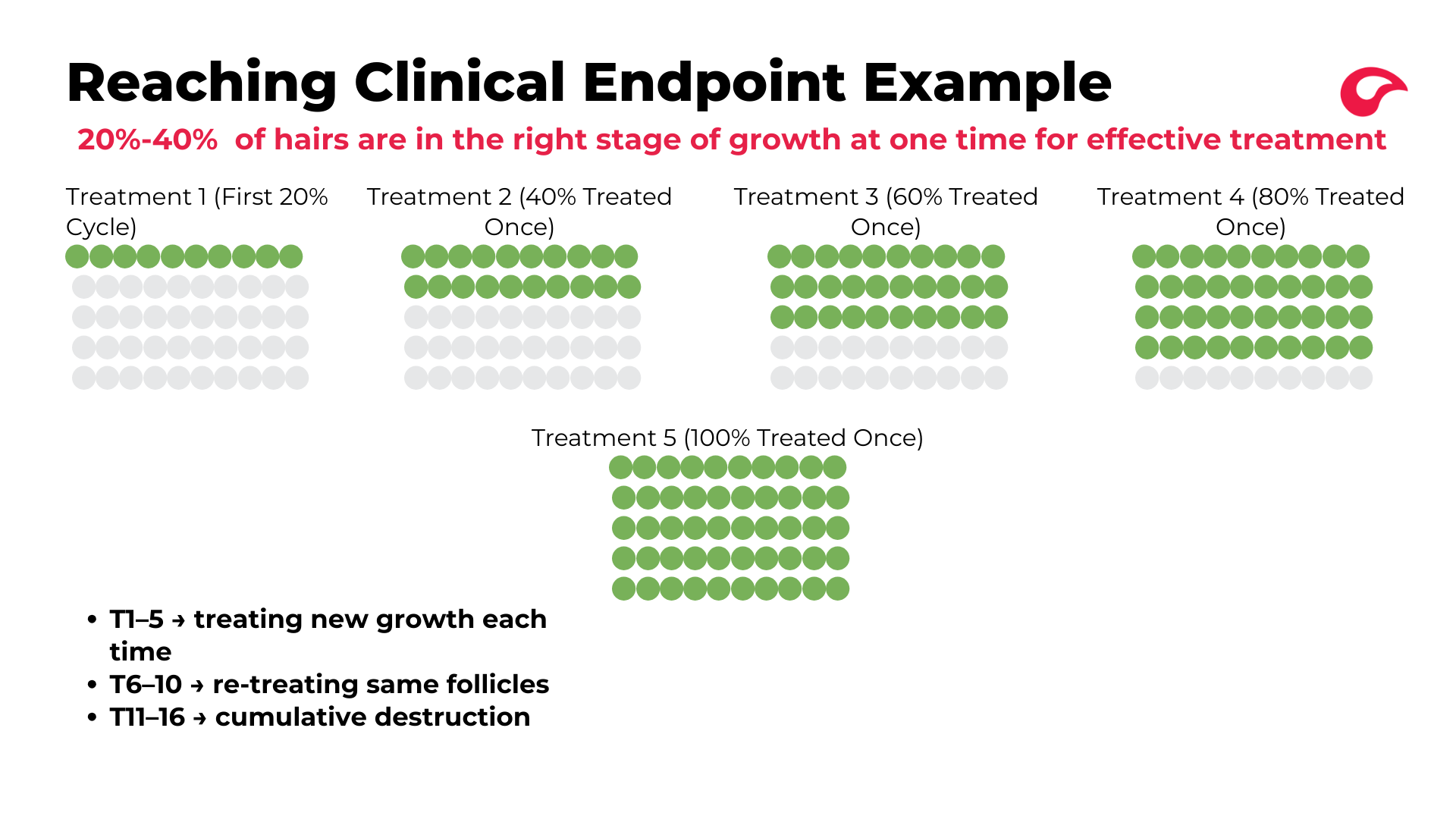
Reaching Clinical Endpoint Example
This is a practical example of the hair growth cycle in action. Assume you're treating an area where about 20% of hairs are in Anagen at any given time.
Treatments 1–5: First pass (new growth)
Each session treats about 20% of hairs that are in Anagen. By treatment 5, you've effectively treated 100% of the hairs in that area once while they were in the correct growth stage.
Treatments 6–10: Second pass (retreating)
You cycle back through and retreat those same hairs a second time in Anagen. This reinforces the damage to the follicles from the first round.
Treatments 11–16: Third pass (clinical endpoint)
A third cycle through ensures you've thoroughly treated all the hairs multiple times during the correct stage of growth to reach true clinical endpoint.
After clinical endpoint: The client only needs to come in once or twice a year for touch-up services when they start to see regrowth.
How To Educate
Now that you understand the science, here's exactly how to explain it to the client. Don't get overly technical — no deep dives into Anagen, Catagen, Telogen. The client is experiencing laser for the first time while you're talking. Keep it focused on the why and get to the point.
Point 1: How laser works
"The way laser works is it uses heat to kill the hair follicle." Tie in how good of a candidate they are: "You're a great candidate for laser because you have dark hair and light skin. The color in the hair is what attracts the heat — that's why you're a good candidate."
Point 2: Why they need to keep coming back
"Not all of your hair today is going to be in the stage of growth to maximize our results. Only about 20–40% of it is at that stage right now. So I need you to keep coming back because next time we'll be treating a different group of hairs in the correct stage, and then another group the next time. We want to treat the hairs while they're in the right stage up to three times to reach clinical endpoint. It's going to take about 4–6 months to treat all the hairs once, and then we go through that two more times to reach true clinical endpoint — which is when we've killed or miniaturized as many hair follicles as possible."
Point 3: When to come back
"Come see me in X weeks so we can treat the next group of hairs."
Setting expectations on results
Be direct: laser does not mean 100% hair gone. Even the best candidate can expect up to 92% hair reduction. Tell them on day one so there are no surprises at the end. And make it clear that the 92% is contingent on consistency — coming in on schedule and not stopping and starting.
- If you stop between treatments, we're starting the process over
- If you wait longer than the recommended timeframe, results will suffer
- If you're not consistent, we won't get maximum reduction — up to 92%, but that drops if we're stopping and starting
Why We Educate
Education isn't just information — it's what makes the membership conversation work. Here's why each educational point matters.
Reason 1: Makes it personal
You can't personalize anything unless you know the client's personal reason for coming in. That's why finding their need comes first. When you deliver your educational points, tie it back to their specific need at the end. For example, after explaining consistency and clinical endpoint: "So if you come back to see me in X weeks and we continue treatment, we'll be able to get you maximum hair reduction so that you can [their personal need]" — less ingrowns, less maintenance, whatever they told you. The education may sound similar for every client, but the ending should be different every time because it's personal.
Reason 2: Sets expectations and builds trust
When you tell a client what to expect and then it happens, that builds trust. They think: "She said this would happen, and it did." That trust compounds — so when you later recommend additional treatments, adding areas, switching to sugaring after laser, or recommending a product, they already have rapport with you. Transparency through the entire process is what creates that.
Reason 3: Gets them in the right mindset for membership
By the time you explain the membership, you want the client already thinking: "Yes, I want to keep doing this because I understand it will solve my problem." The membership is just the vehicle that saves them money while doing something they already want to do. If they haven't had the education conversation first — if they don't understand why consistency solves their need — the membership pitch falls flat. Education first, membership second. They need to want to be consistent before you ever mention saving money with a membership.
Membership
Pre-Book
Finish education about halfway to three-quarters through the service. Use the remaining time to connect with your client and finish up. Then move into pre-booking — in a suite, this is when you're heading to the computer and the client is getting dressed. In a flagship, it's as you exit the room and walk to the lobby.
The pre-booking question:
"X weeks from today is [date]. Would you like a similar time as today's appointment?"
This assumes the pre-book rather than asking a yes/no question. Most clients will go with it. If they have an objection, they'll raise it.
Why pre-book before explaining membership:
If the client is already booked for their next appointment, there's even more incentive to get on a membership and save money on that next service. This helps with objection handling later.
Understanding The Membership
The laser membership is structured exactly like the existing Wax/Sugar membership so clients can easily understand it if they've been members before.
How it works:
- One-time startup fee: $250 or $450 (depends on membership type)
- Monthly payments on the 1st or 15th create a voucher in their account
- Voucher is used when they come in for their service
- Pause or cancel anytime
- Financing available through a partner firm for clients who qualify (set up on the day they sign up)
The 16-treatment cap:
The membership stops charging and accruing vouchers after 16 payments — matching the average number of treatments to reach clinical endpoint. Treatments start at every 4 weeks, then space out to 6–8 weeks as you progress, but the monthly charge continues until 16 vouchers are reached. If a client needs additional treatments beyond 16, they just come in and pay member price — no need to adjust the membership. They get member price for life, including yearly touch-ups.
Single Area Pricing
Areas are grouped by size: extra small (individual face areas like lip, cheeks, chin), small, medium, and large.
- Extra small and small area memberships: $250 startup
- Medium and large area memberships: $450 startup
The monthly charge varies by area size. For example, Brazilian (medium area) is $450 startup + $85/treatment. Non-member a la carte pricing is more expensive to incentivize membership — laser isn't a one-and-done service, so you want clients on a membership to reach clinical endpoint at a better price.
Combo Memberships
This is where it gets exciting. Clients with at least two medium-size areas qualify for combo pricing, and they get underarms for free. All combo memberships are $450 startup. Combos go from Pick 2 up to Pick 10 (for full body). Each bump up adds $45/treatment.
Membership Upgrades
- Client on extra small or small ($250 startup) upgrading to combo → charge the $200 startup upgrade difference in Boulevard, then cancel old membership and set up the new one
- Client already on medium, large, or combo ($450 startup) adding areas → no additional startup fee, just cancel old membership and set up the new tier
Examples:
- Brazilian + lower legs → 2 medium areas → Pick 2 combo, $450 startup, $115/treatment, free underarms
- Brazilian + full legs + stomach strip → 3 medium + 1 small → Pick 4 combo (not Pick 3 + separate small, since the price is the same), $450 startup, $205/treatment, free underarms
- Lip and chin → Small area (lip & chin is a paired service), $250 startup, $45/treatment
- Full face + Brazilian + underarms → 2 medium areas → Pick 2 combo, underarms free, $450 startup, $115/treatment
Explain The Membership
Keep this as simple and clear as possible. Confusion causes clients to say no. Before you start, you should already know from your conversation what areas they're interested in — this determines whether you present single area, combo, or both.
Don't rush, but be concise. Pause between points and check that they're following.
Single Area Script:
"Today you're at [price] for your service. The way our membership works is there's a one-time startup of $450, and then each month on the 1st or 15th, [amount] comes out and puts a voucher into your account for your session. So when you come in, it's already paid for."
"You can pause or skip months anytime, and you can cancel anytime through the app. You have full control."
"Once we reach clinical endpoint — which is on average about 16 sessions — we end the monthly payments and you'll just come in one to two times per year for touch-ups at member price."
Then present the combo (for most clients):
Even if the client is only getting one area today, if they've mentioned interest in any other areas, present the combo option. You don't need a firm yes or no on whether they want additional areas — just knowing they're interested is enough to present the options.
"We also have a combo membership which pairs services for a cheaper price per treatment. It's still that one-time $450 startup, and then [amount] comes out monthly on the 1st or 15th, putting a voucher in your account. All the combos come with underarms for free. So for [price] per treatment, you'd get [area], [area], and underarms."
Close The Sale
After explaining the membership, close with one of these approaches:
Approach 1: Assume the sale (recommended)
"Are you thinking the single area or combo membership would make more sense for you?"
This assumes they're getting a membership and just asks which one. It gives them an opening to ask questions or share hesitations so you can objection handle and guide them toward the right option.
Approach 2: Direct ask
"Would you like to set up the membership so we can get you the hair reduction results you're looking for?"
Either way, this is when the client will ask questions or voice hesitations — handle them from there.
Profile Notes
Once the client walks out the door, put notes in their profile. Two things matter:
1. Other areas of interest
If they mentioned any interest in additional laser areas — even casually — note it. A client might decline a combo membership today but be open to upgrading later. Since upgrades are easy, you or another laser tech can follow up next visit and encourage them to add areas.
2. If they didn't sign up, note why
What was their objection? How did you handle it? This sets you or the next laser tech up to customize the approach on future appointments and close the sale down the line.